Features
Screenshots from the current build on a dedicated iPhone 17 Pro simulator with fictional demo data: synthetic artwork in the gallery, the reserved host nas.example.invalid, invented counts and file names. No real library, server or account.
Photos
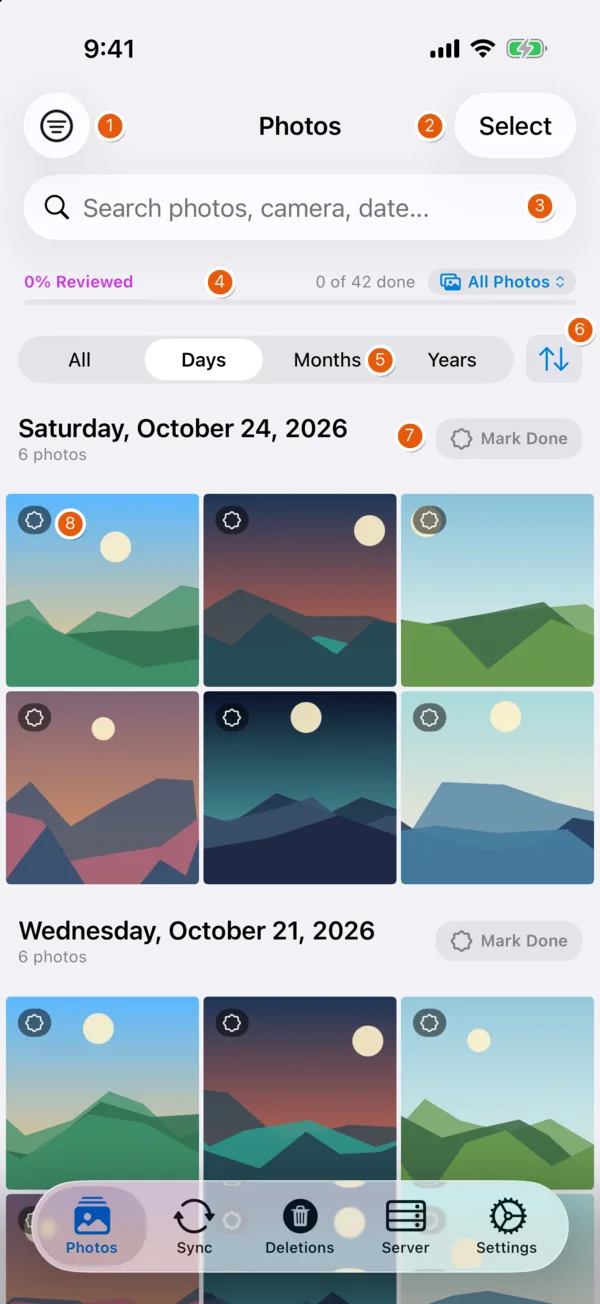
| # | Element | Function |
|---|---|---|
| 1 | Filter | Year, camera model, media type, review status, Hidden album |
| 2 | Select | Multi-select: share, favorite, hide, compare (2+), delete |
| 3 | Search | Photos by camera or date |
| 4 | Review progress | Share of items marked reviewed; filter All / Not Reviewed / Reviewed |
| 5 | Grouping | Days, Months, Years or ungrouped |
| 6 | Sort | Date or file size, ascending or descending |
| 7 | Mark Done | Marks the whole day, month or year as reviewed |
| 8 | Badges | Review state and server state per item |
The viewer adds zoom, video scrubbing, EXIF and histogram, side-by-side comparison and an editor (adjustments, filters, crop, rotate, trim). Edits are saved to Apple Photos with their EXIF and location data. Every deletion goes through the iOS confirmation dialog.
Sync
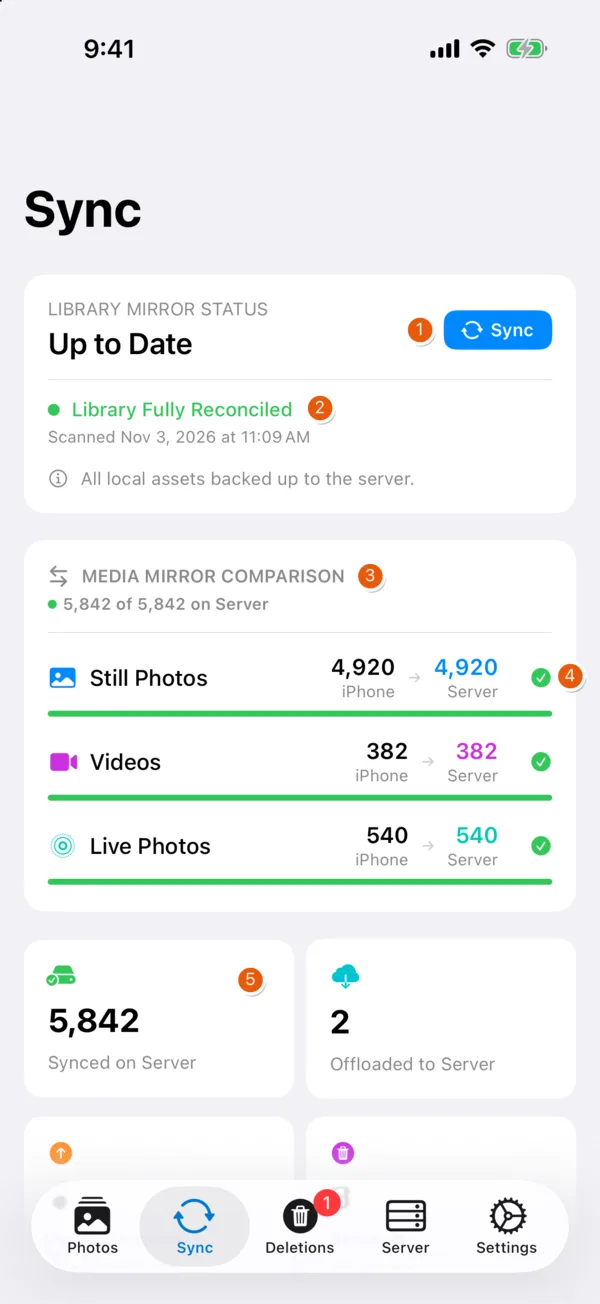
| # | Element | Function |
|---|---|---|
| 1 | Sync | Scan, upload, then stage deletions and server changes for review. Secondary: Rescan Only, Dry-Run Preview |
| 2 | Mirror status | Result of the last scan and reconciliation |
| 3 | Mirror comparison | Items on iPhone vs. server, per type |
| 4 | Per-type state | Complete, or the percentage still missing |
| 5 | Counters | Items synced to and offloaded on the server |
Further down: Server History (uploads and Bin moves by day), inbound changes from the server, and Free Up Space, which deletes local copies of uploaded items and marks them as offloaded (restorable from the server).
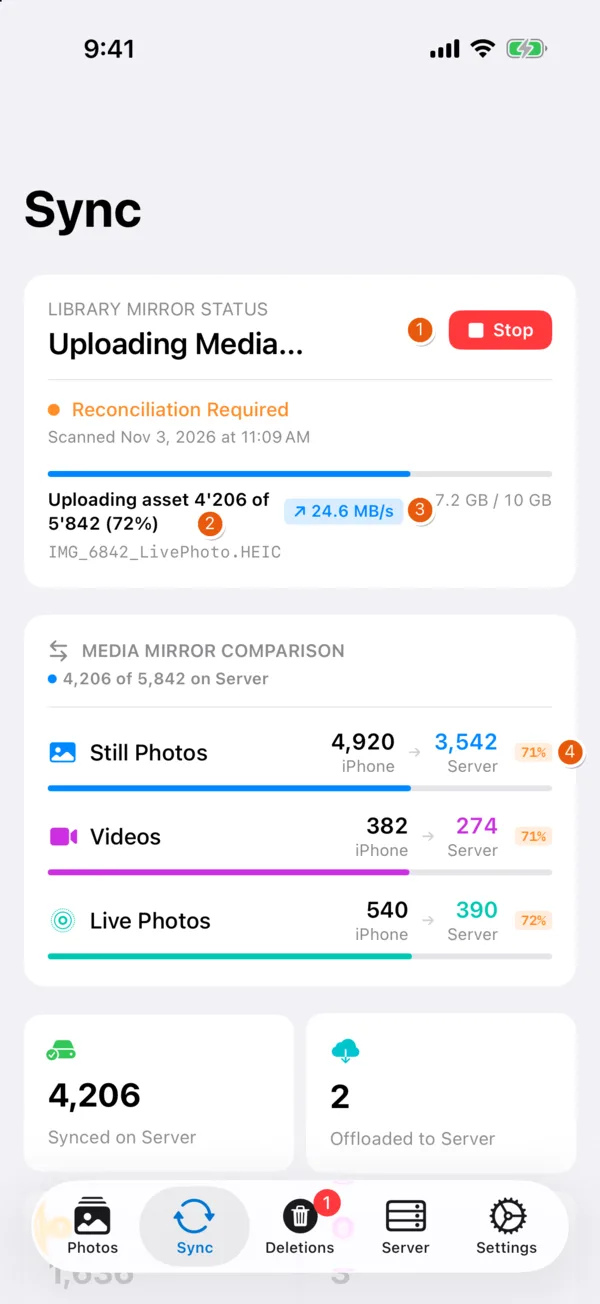
| # | Element | Function |
|---|---|---|
| 1 | Stop | Cancels the run; deletion mirroring is skipped for an incomplete scan |
| 2 | Progress | Current item, count, bytes transferred |
| 3 | Throughput | Live upload rate |
| 4 | Per-type progress | Share already on the server |
Uploads stream to a temporary file on the server and are renamed into place only when complete. Background sync runs when iOS grants time; it is not guaranteed.
Server Additions
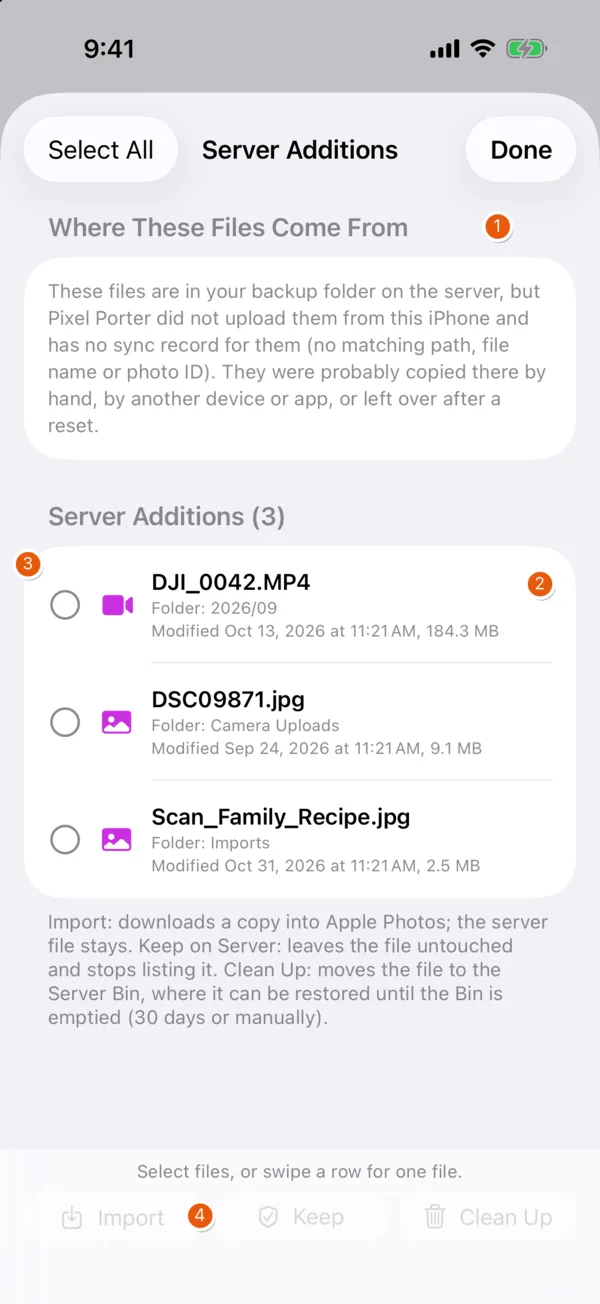
| # | Element | Function |
|---|---|---|
| 1 | Provenance | Why these files are listed: in the backup folder, but not uploaded by this iPhone |
| 2 | File details | Folder, modification date, size |
| 3 | Selection | Select files for a batch action, or swipe a row |
| 4 | Actions | Import into Apple Photos, Keep (stop listing), Clean Up (move to the Server Bin) |
Each action asks for confirmation. Cleaned-up files can be restored to their original folder from the Bin.
Server
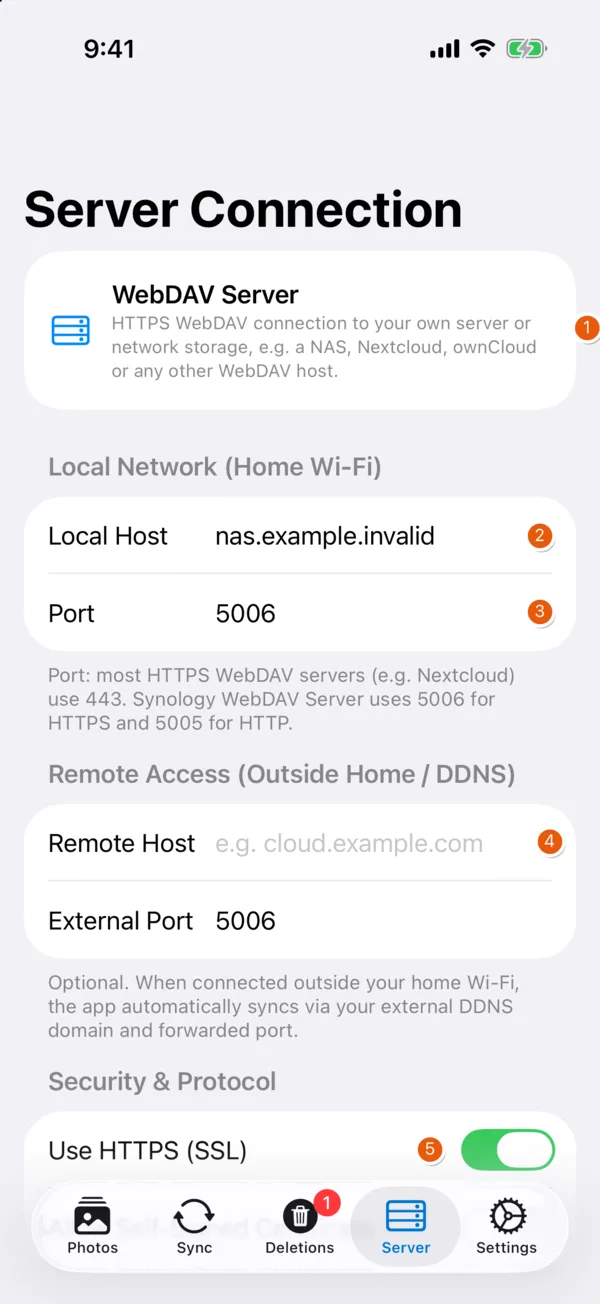
| # | Element | Function |
|---|---|---|
| 1 | Server type | Generic WebDAV |
| 2 | Local host | Address on the home network, probed first (2 s timeout) |
| 3 | Port | Synology WebDAV: 5006 (HTTPS); most others: 443 |
| 4 | Remote host | Optional address for outside the home network (DDNS or public name), used when the local probe fails |
| 5 | HTTPS | On by default. Self-signed certificates need an explicit toggle |
Further down: user name, password (Keychain), destination path, Bin path, connection test. The external port defaults to 5006 (Synology WebDAV HTTPS); set the port your router forwards.
Deletions
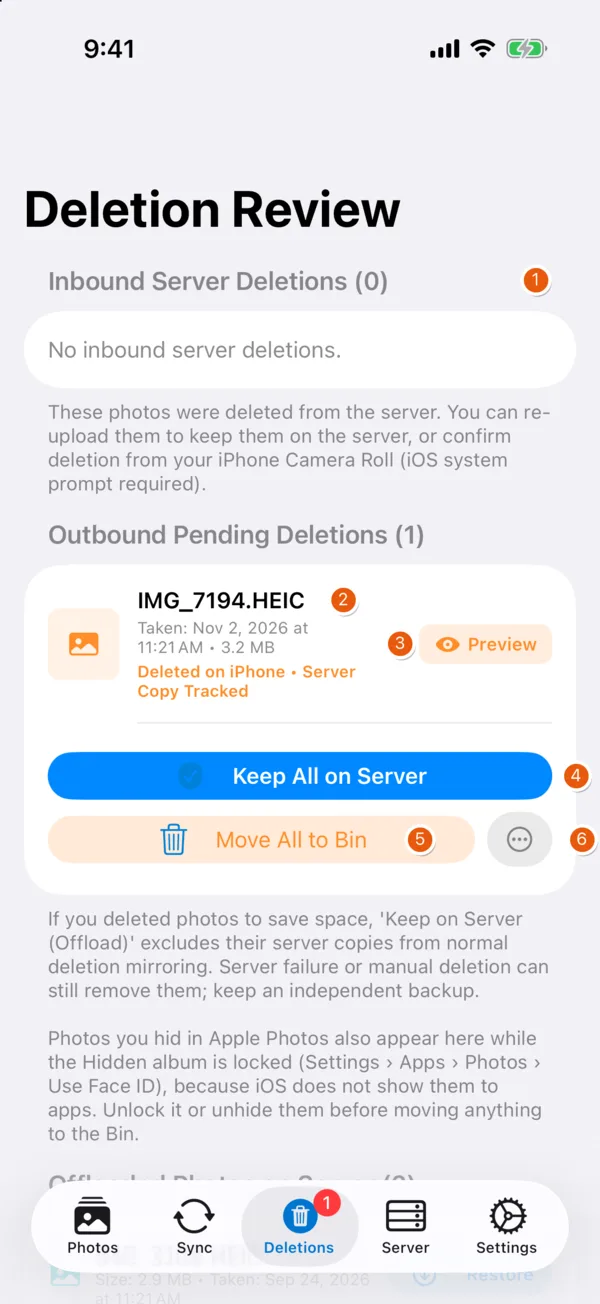
| # | Element | Function |
|---|---|---|
| 1 | Inbound | Files deleted on the server: re-upload, or delete from Apple Photos |
| 2 | Outbound | Items deleted on the iPhone whose server copy still exists |
| 3 | Preview | Loads the server copy |
| 4 | Keep All on Server | Leave server copies untouched |
| 5 | Move All to Bin | Move server copies to the dated Server Bin |
| 6 | More | Delete directly without the Bin (confirmation required) |
Further down: Offloaded Photos (restore to Apple Photos) and the Server Bin (restore, purge, empty items older than the retention period).
Settings
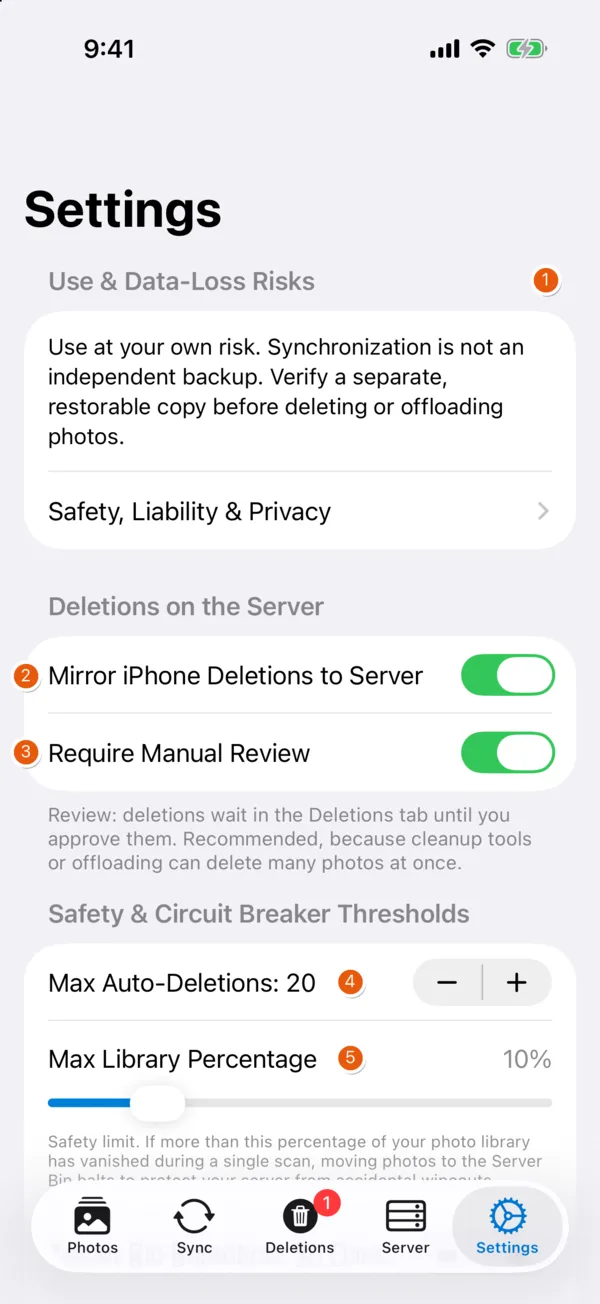
| # | Element | Function |
|---|---|---|
| 1 | Risk notice | Permanent link to safety, liability and privacy notes |
| 2 | Mirror iPhone Deletions | Off by default: server copies are only listed |
| 3 | Require Manual Review | On by default: mirrored deletions wait for approval |
| 4 | Max Auto-Deletions | Circuit breaker, absolute (default 20) |
| 5 | Max Library Percentage | Circuit breaker, relative (default 10 %) |
Further down: Bin retention (default 30 days), weekly sync and review reminders, camera-model filter, inbound server sync, diagnostic log export, guide, What's New, reset.
What's New
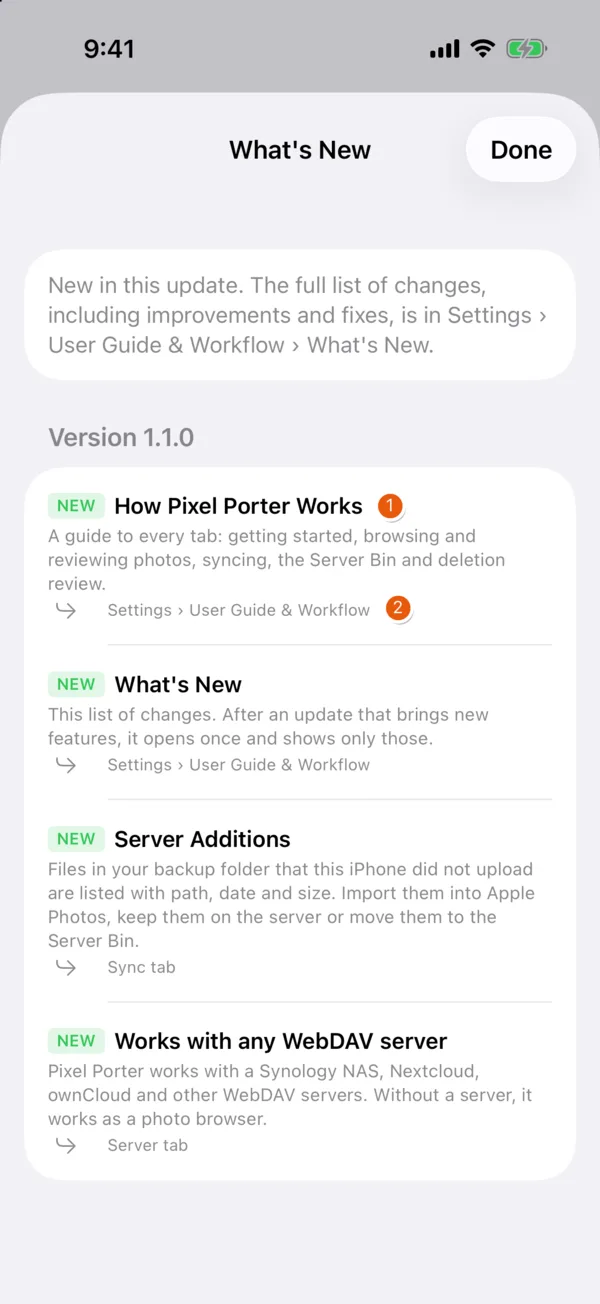
| # | Element | Function |
|---|---|---|
| 1 | Entry | Type (new, improved, fixed) and title |
| 2 | Location | Where to find the feature in the app |
Settings › User Guide & Workflow › What's New lists every entry. After an update with new features, the sheet opens once and shows only those. The same data produces the changelog.